
.png)
Description
Download Weather Me Good – AI‑Driven Weather Forecasts for Travelers
Overview
Planning a trip can feel like solving a puzzle: you need to know the climate, find good places to eat, and discover activities that match the local vibe. Weather Me Good steps in as a smart, AI‑powered travel companion that consolidates all of those pieces into a single, easy‑to‑use web application. Built on top of OpenAI’s ChatGPT through the Orhanerday PHP Library, the platform delivers dynamic, location‑specific weather forecasts that are not only accurate but also enriched with curated restaurant recommendations and activity suggestions. The moment you select a city and enter your travel dates, the AI engine generates a multi‑day outlook, highlights the best times to explore outdoor attractions, and even suggests where to grab a bite based on local reviews and personal preferences.
What makes Weather Me Good stand out is its blend of reliability and personalization. The AI model is trained to provide consistent forecasts for the same city and date range, reducing the anxiety that often comes with changing weather predictions. Moreover, the application’s interface is built with Bootstrap, ensuring a responsive design that works flawlessly on desktop, tablet, and mobile browsers. Continuous updates keep the system aligned with the latest meteorological data sources and improve the relevance of the activity recommendations. Whether you are a weekend explorer, a digital nomad, or a family on vacation, Weather Me Good offers a secure, free‑to‑use tool that transforms vague weather reports into actionable travel plans.
In addition to the core forecasting functionality, the platform respects user privacy and operates entirely within the browser, meaning no intrusive downloads or heavy installations are required. The next sections dive deeper into the feature set, walk you through the quick setup process, outline system compatibility, and weigh the pros and cons so you can decide if Weather Me Good is the right travel assistant for your next adventure.
Key Features
- AI‑Enhanced Weather Forecasts: Uses OpenAI’s ChatGPT to generate detailed, city‑specific weather predictions for the exact dates you plan to travel.
- Restaurant Suggestions: Curated dining options based on local popularity, cuisine type, and user preferences, all presented alongside the weather outlook.
- Activity Recommendations: Tailored suggestions for indoor and outdoor activities that align with the forecasted conditions, helping you make the most of each day.
- Consistent Results: The AI model ensures that the same city and date range produce consistent forecasts, reducing uncertainty.
- Responsive Design: Built with Bootstrap, the interface adapts seamlessly to desktops, tablets, and smartphones.
- Secure, No‑Download Needed: Operates completely in the browser, eliminating the need for installing software or exposing personal data.
- Continuous Updates: Regular backend improvements keep weather data current and enhance the relevance of restaurant and activity suggestions.
- Multi‑Language Support: Future‑ready architecture that can accommodate additional languages as the user base expands.
- Free Access: All core functionalities are available at no cost, with optional premium features planned for future releases.
Each feature has been designed with the modern traveler in mind. The AI engine not only predicts temperature, precipitation, and wind speed but also interprets how those conditions affect daily plans. For example, a forecast of light rain in the afternoon might trigger a recommendation for a museum visit or a cozy café, while a sunny morning could prompt a suggestion for a city‑wide bike tour. By coupling weather data with contextual activity insights, Weather Me Good turns a simple forecast into a personalized itinerary builder.
The platform also respects the need for quick decision‑making. All suggestions appear on a single page, allowing you to scroll through weather, dining, and activity options without juggling multiple tabs or apps. The UI’s clean layout, powered by Bootstrap’s component library, makes it easy to locate the information you need at a glance. Whether you are checking a weekend getaway or a month‑long expedition, the feature set scales to fit any travel horizon.
Installation, Usage & Compatibility
Installation: Weather Me Good is a web‑based application, which means there is nothing to download or install on your device. Simply navigate to the official website using any modern browser (Chrome, Firefox, Safari, Edge) and you are ready to start. The site is hosted on a secure HTTPS server, ensuring that all data exchanged between your browser and the AI backend is encrypted.
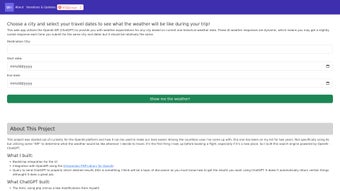
Getting Started: Upon loading the homepage, you will see a clean input form. Select your destination city from the dropdown or start typing to trigger the auto‑complete feature. Next, choose your travel dates using the integrated calendar picker. Once the dates are set, click the “Generate Forecast” button. Within seconds, the AI processes the request and returns a multi‑day weather outlook, accompanied by a list of recommended restaurants and activities for each day.
The results are organized in expandable cards, each representing a single day of your trip. Clicking a card reveals detailed weather metrics (temperature highs and lows, humidity, precipitation probability) and a short narrative explaining how the forecast might impact typical travel plans. Below the weather block, you’ll find curated dining spots with brief descriptions, rating snippets, and direct links to reservation platforms. Further down, activity ideas are grouped by category (outdoor, cultural, family‑friendly) and are filtered based on the day's expected conditions.
Compatibility: Weather Me Good is compatible with any operating system that can run a modern web browser, including Windows 10/11, macOS Ventura and later, Linux distributions, iOS 13+, and Android 9+. Because the service is browser‑based, there are no platform‑specific binaries to manage, and the responsive design ensures an optimal experience on both high‑resolution desktops and smaller mobile screens. The application leverages HTML5, CSS3, and JavaScript, so as long as your browser supports these standards (which virtually all current browsers do), you will enjoy full functionality.
Tips for Power Users: For travelers who frequently check multiple destinations, consider bookmarking the site or adding it to your mobile home screen for quick access. The URL can also be shared via email or messaging apps, allowing friends or family members to view the same forecast and suggestions. If you encounter any inconsistencies or have feature requests, the website includes a feedback button that sends your comments directly to the development team, ensuring continuous improvement.
Pros, Cons, Frequently Asked Questions & Conclusion
Pros
- AI‑driven forecasts provide context‑aware weather insights.
- Integrated restaurant and activity recommendations reduce planning time.
- No installation required; runs securely in any modern browser.
- Responsive design works across Windows, macOS, Linux, iOS, and Android.
- Free core features with a roadmap for premium enhancements.
Cons
- Advanced premium features (e.g., offline access) are not yet available.
- Relies on internet connectivity; offline usage is limited.
- Currently supports a limited set of languages; expansion planned.
- Restaurant suggestions are based on public data and may not include the newest openings.
Frequently Asked Questions
Is Weather Me Good really free to use?
Yes, all core functionalities—including weather forecasts, restaurant suggestions, and activity recommendations—are completely free. Future premium options may be introduced, but the essential travel planning tools will remain free.
How accurate are the AI‑generated weather forecasts?
The forecasts combine OpenAI’s language model with reputable meteorological data sources. While no forecast can be 100% certain, the AI is designed to provide consistent and context‑aware predictions that are comparable to major weather services.
Can I use Weather Me Good on my smartphone without an app?
Absolutely. The site is fully responsive and works in any mobile browser on iOS or Android. You can also add it to your home screen for a near‑app experience.
What data is collected when I use the service?
Only minimal data needed to process your request (city name, travel dates, and browser information) is transmitted over HTTPS. No personal identifiers or payment details are stored.
How often is the content updated?
The backend receives daily updates from weather providers, and the AI model is retrained periodically to improve recommendation relevance. Users typically see the latest information each time they generate a new forecast.
Conclusion & Call to Action
In a world where travel plans can be derailed by unexpected weather, Weather Me Good offers a proactive solution that blends accurate forecasts with practical lifestyle suggestions. Its AI‑driven engine, coupled with a clean, responsive interface, makes it a standout tool for both spontaneous weekend trips and meticulously planned vacations. Because it runs entirely in the browser, you avoid the hassle of downloads and the risk of installing untrusted software—security and convenience are baked into the experience.
Whether you are a seasoned globetrotter or planning your first adventure, the platform empowers you to make informed decisions, maximize enjoyment, and reduce the stress that comes with uncertain weather. Give Weather Me Good a try today: simply visit the official website, enter your destination and dates, and let the AI do the heavy lifting. Your next perfect trip could start with just a few clicks.
Guides & Tutorials for Weather Me Good
How to install Weather Me Good
- Click the Preview / Download button above.
- Once redirected, accept the terms and click Install.
- Wait for the Weather Me Good download to finish on your device.
How to use Weather Me Good
This software is primarily used for its core features described above. Open the app after installation to explore its capabilities.
User Reviews for Weather Me Good 0
No reviews found




